
Thank you for choosing OriginHobbies to be your dealer for OMPHobby and Radiomaster products. We have carefully prepared the RTF model configuration for you so you can start flying your helicopter as easily as possible. We still recommend that you carefully read this guide so that you are confident to make your first flight. If you have any questions please do not hesitate to contact us. Best wishes!
Batteries (setup and care):
Your T6 Radio Transmitter is not fully charged for safety during transportation. Please charge the Radio Transmitter to 100% before first use. The Red LED is blinking during charging process. The Red LED will be steady when fully charged. It can take several hours to fully charge.
Battery care tips:
- The Helicopter LiPo batteries are shipped at storage charge (50%). Please fully charge the helicopter battery before any flight. It is recommended to use a balance charger at 1C (max 2C).
- Avoid quick charge programs. They will cause the cells to go out of balance with time.
- Don’t leave battery charging process unattended. There is always risk of heating and fire so you must be present nearby to take proper action if that happens.
- Always use a flight timer depending on your flying style and ensure that battery is never discharged less than 25% capacity. (about 3.73V per cell)
- When not in use for prolonged periods, charge all LiPo batteries to storage charge (50% charge or 3.86V per cell).
- Following these simple rules will ensure your batteries are in good health and you can have many flights with them.
Radio Switch Assignment:
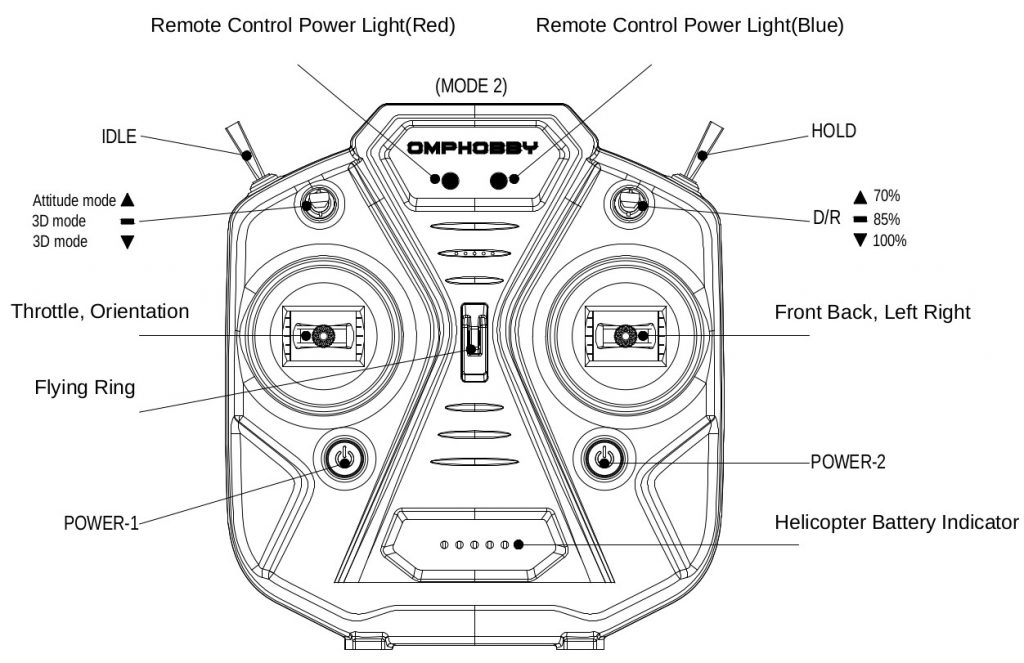
Switch position guide: ↑ (away from you), – (middle), ↓ (towards you)
| Function | Switch |
|---|---|
| Throttle hold | HOLD (↑Throttle cut disabled,↓Throttle cut) |
| Flight mode (Normal, Idle-up1, Idle-up2) | IDLE (↑Normal, -Idleup1, ↓Idleup2) |
| Rescue switch | SA (button) [Not applicable for OMP protocol] |
| Attitude hold (Self level) ON/OFF | ↑Normal, -Self-Level ↓Self-level |
| Dual Rates (D/R) | ↑70%, -85% ↓100% |
Start up procedure:
- Make sure all switches are in home position. Away from you.
- Turn ON the Radio. Press both POWER-1 and POWER-2 buttons together to Power ON the radio
- Once Radio is turned on, Engage Throttle hold (HOLD switch towards you).
- Place the Helicopter on a level surface and plug in the battery to the Helicopter. Wait for gyro calibration to complete. It will indicate with beeps and twitching servos.
- Move Aileron, Elevator and Collective Pitch sticks on Radio and check if servos are moving in right order and direction.
- Fix the canopy on Helicopter.
- Ensure that Flight mode switch (IDLE) is in Normal-mode position. (Farthest away from you)
- Bring Collective pitch (throttle) stick to Full negative.
- Disengage Throttle Hold switch (HOLD). Helicopter rotor will not yet start as throttle is zero in Normal mode full negative collective pitch.
- Increase Collective pitch(throttle) stick to near center. Wait for RPM to reach at constant level. Now you can take off and fly the helicopter.
If you feel the helicopter is too twitchy you can set Dual/Rate switch to 85% or 70% position.
Flying the Helicopter (tips):
- Never fly near people or animal or objects as it increases the chances of crash and injury.
- Always practice on the simulator till you are 100% confident and only then try it on the model helicopter. Don’t try new maneuvers first on the model helicopter as it increases chances of a crash.
- Always keep a finger ready on throttle hold switch to engage it just before a crash to minimize crash damage.
- If you loose orientation you can make use of rescue mode to self level and climb up. I would suggest to avoid depending on this mode. Simulator practice is the best investment you can make in this hobby.
Landing Procedure:
- Put helicopter in Normal mode for lowest RPM. Flight mode switch (IDLE) away from you.
- Gently bring the helicopter to the landing spot and close to the ground. Choose a level surface with no nearby obstacles for the landing spot.
- Once the helicopter is a few centimeters from the ground, reduce throttle stick to zero or engage the throttle hold switch (HOLD). Helicopter should land softly on the ground.
Stability mode:
In Stability mode the helicopter tries to self level itself so it is much easier to hover in this mode.
Self level mode can be entered by Attitude mode switch away from you. Red LED on Helicopter’s Flight controller will be steady in this mode. You cannot perform flips/rolls or inverted flight in this mode.
As a beginner you may start with self level mode but it is not recommended to practice in this mode as you will not develop correct hovering skills and forward flight skills.
Attitude mode Switch in middle or towards you will disable Stability mode and enable 3D mode. Red LED on Helicopter FBL controller will be flashing. We recommend that you always fly in this mode.
If any questions feel free to contact us at info@originhobbies.com
Happy Flying!
 EN
EN  FI
FI  SV
SV  DA
DA  DE
DE  FR
FR