
The M2 Juice Gauge is designed to be a plug and play solution to enable advanced telemetry features on your M2 helicopter.


Installation
- Feed the provided Zip-tie cable through the Bind and LED holes on the M2 Flight controller.
- Attach small piece of double sided tape to the bottom of Juice Guage at the center.
- Connect the XT30U-F port to M2 Flight controller’s XT30U-M port
- Connect the 3-pin SBUS connector to the S-BUS port on the M2 Flight controller.
- Tighten the zip tie so that the Juice Gauge is secured tightly to the flight controller.
NOTE! Do not over tighten else you will break the flight controller case. - Connect 5-pin JST connector to the R-XSR telemetry receiver.
- Mount the receiver to the side of the flight controller using double sided tape.
- Secure the 2 antenna wires using pieces of duct tape. Keep 90degrees angle between the antenna for diversity.
Binding
- Download the EVO R-XSR Model from our website and load it to your Radio transmitter. (TX16S / Zorro / TX12 / Boxer).
- Turn on the Radio transmitter and select EVO R-XSR model.
- Go to Model Setup page and ensure the following
MODE: MULTI RF Protocol: FrSkyX2 : LBT(EU) - While pressing the bind button on the receiver, plug the Battery to XT30U-M port of Juice Gauge. Release bind button. Red, Green and Blue LEDs on the receiver should be steady ON. This means receiver is in bind mode
- On the Transmitter, select “Bind” and press Enter. Select “Ch1-8 Telem ON”
- When binding completes Green LED will start flashing on the receiver.
- Unplug the Helicopter battery and plug it back.
- Go to Model→Telemetry page on the transmitter. You should see the following sensors
| Sensor Name | Description | Unit |
|---|---|---|
| RxBt | Receiver Power Voltage | Volts |
| Curr | Battery Current | Amps |
| VFAS | Battery Voltage | Volts |
| RSSI | Signal Strength at Receiver | dB |
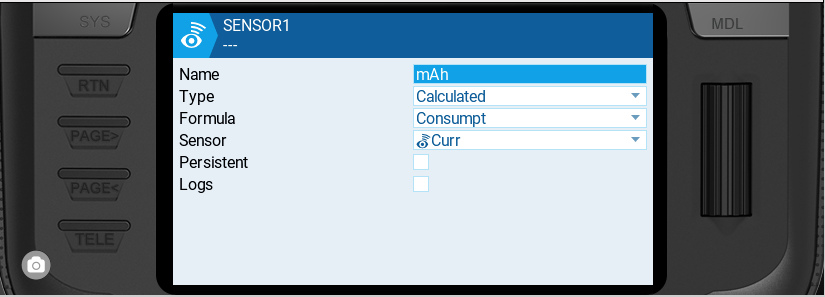
If you do not see the mAh sensor you can add it as shown below by clicking on “Add Sensor“
Ensuring Receiver is in SBUS mode
The R-XSR receiver supports SBUS and CPPM modes on pin 4. The receiver should be in SBUS mode to work properly with the M2 Helicopter. When in SBUS mode the Blue LED will be steady ON. If it is not turned ON then press the button on the receiver for 4 seconds till the Blue LED turns ON. Now it is in SBUS mode.
Telemetry widget for OpenTX/EdgeTX
We will soon provide a telemetry widget for OpenTX/EdgeTX radios with following features
- Set Model battery capacity (mAh)
- Set Battery Low/Critical limits
- Voice announcement and Haptic vibration on Battery Low/Critical
- View Battery Voltage, Current, mAh consumed, Battery % remaining, Signal strength
 EN
EN  FI
FI  SV
SV  DA
DA  DE
DE  FR
FR